
How to Cancel Depop Order
Accidentally bought the wrong item? Changed your mind a few minutes after checking out? You’re not the only one. Many shoppers wonder how to cancel a Depop order, especially if the seller hasn’t shipped the item yet. Therefore, many shoppers search how to cancel Depop order for help with the process.
Unlike some online marketplaces, Depop doesn’t have a one-click “Cancel Order” button for buyers. Instead, cancellations usually depend on communication between the buyer and the seller. The sooner you act, the better your chances of receiving a refund before the package is shipped.
Overall, this guide explains how the cancellation process works, what buyers should expect, refund timelines, and the best practices to avoid problems in the future.
Quick Answer
If you’re looking to cancel a Depop order, follow these basic steps:
- Contact the seller immediately.
- Explain why you want to cancel.
- Ask whether the order has already shipped.
- If it hasn’t shipped, request a cancellation and refund.
- If the seller agrees, they can process the refund through the original payment method.
- If there’s a problem, use Depop’s support process if you’re eligible.
Ultimately, acting quickly gives you the best chance of canceling successfully.
Quick Reference Table
| Situation | Can You Cancel? |
|---|---|
| Seller has not shipped yet | Usually yes, if the seller agrees |
| Item already shipped | Usually no, unless seller accepts a return |
| Wrong shipping address | Contact seller immediately |
| Purchased by mistake | Ask seller as soon as possible |
| Seller won’t respond | Wait, then contact Depop Support if needed |
Does Depop Have a Cancel Order Button?
Many new users expect to find a cancellation option inside the app.
Currently, buyers generally cannot cancel an order themselves after payment.
Instead, the process relies on communication with the seller.
If the seller hasn’t packaged or shipped the item, many are willing to cancel the transaction.
How to Cancel a Depop Order
If you’re searching for how to cancel a Depop order, speed matters.
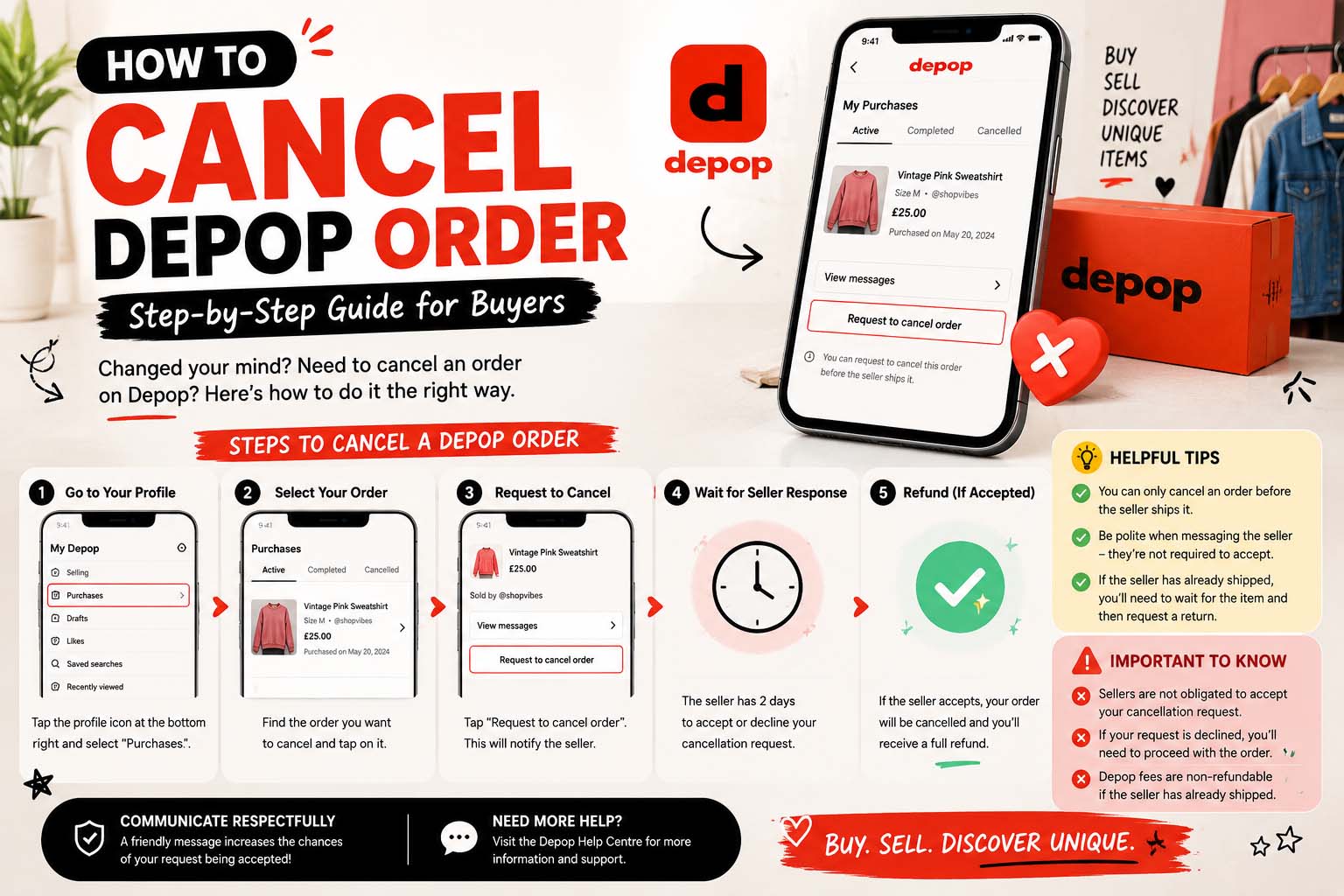
Step 1: Open Your Purchase
Go to:
- Your profile
- Purchases
- Select the order
Step 2: Message the Seller
Be polite and explain the situation.
For example:
“Hi! I accidentally placed this order. If it hasn’t shipped yet, would it be possible to cancel and refund it? Thank you!”
Generally, a friendly message leads to a faster response.
Step 3: Wait for Confirmation
The seller may reply with one of several responses:
- They agree to cancel.
- The item has already shipped.
- They need time to check.
- They decline the request.
Remember that individual sellers set their own shop policies within Depop’s rules.
How to Cancel an Order on Depop Before Shipping
The easiest cancellations happen before shipping.
If the seller has:
- Not printed the shipping label
- Not packed the order
- Not mailed the item
They’re usually in the best position to cancel and issue a refund.
Therefore, contacting them immediately is recommended.
How to Cancel Order on Depop After Shipping
Many buyers search for how to cancel order on Depop after receiving a shipping notification.
At this point, cancellation becomes more difficult.
Instead, you may need to discuss:
- Return options
- Refund eligibility
- Store policies
- Buyer protection options
Because every situation is different, communication is still the first step.
How to Cancel Depop Order as Buyer
If you’re wondering how to cancel Depop order as buyer, keep these tips in mind.
Contact the Seller First
Most successful cancellations begin with a simple message.
Explain Clearly
Whether you:
- Ordered the wrong size
- Bought accidentally
- Changed your mind
Be honest and respectful.
Don’t Open Multiple Cases Immediately
Give the seller a reasonable opportunity to respond before escalating the issue through official support channels.
What Happens After a Cancellation?
If the seller approves the cancellation, they typically issue a refund through the original payment method.
Depending on your payment provider, refunds may take:
| Payment Method | Typical Processing Time* |
|---|---|
| Card payment | Several business days |
| Digital wallet | Often within a few business days |
| Bank processing | May vary |
*Actual processing times depend on your payment provider and financial institution.
Can a Seller Refuse to Cancel?
Yes.
If the order has already been prepared or shipped, the seller may choose not to cancel.
In fact, many independent sellers begin packing orders soon after payment.
Therefore, respectful communication usually produces the best outcome.
Common Reasons Buyers Cancel Orders
People cancel for many reasons.
Common examples include:
- Wrong size selected
- Duplicate purchase
- Incorrect shipping address
- Changed mind
- Ordered the wrong item
- Financial reasons
Mistakes happen, which is why contacting the seller promptly is helpful.
What If the Seller Doesn’t Respond?
If you don’t receive a reply:
- Wait a reasonable amount of time.
- Check whether the item has shipped.
- Review Depop’s buyer protection information if the situation remains unresolved.
However, patience often helps, especially during weekends or holidays.
Tips Before Buying on Depop
Preventing cancellations is easier than requesting one later.
Double-Check Measurements
Vintage and second-hand clothing sizes may differ from modern sizing.
Therefore, read measurements carefully. Likewise, shoppers interested in secondhand retail may ask what is a thrift store or what is a flea market.
Review Photos
Look at every image before purchasing.
Zoom in if necessary.
Read the Description
Descriptions often include:
- Condition
- Flaws
- Material
- Measurements
- Shipping information
Ask Questions
If you’re unsure about a product, it’s always a good idea to contact the seller before making a purchase.
Most sellers are happy to answer reasonable questions.
Buyer Checklist Before Checkout
Take a few seconds to review everything.
- ✔ Correct item selected
- ✔ Right size
- ✔ Correct color
- ✔ Shipping address updated
- ✔ Payment method confirmed
- ✔ Read seller policies
- ✔ Reviewed photos
- ✔ Asked questions if needed
Ultimately, a quick review helps reduce accidental purchases.
Benefits of Contacting the Seller Quickly
| Advantage | Why It Helps |
|---|---|
| Faster response | Seller may not have packed the order yet |
| Better refund chances | Easier before shipment |
| Less confusion | Clear communication prevents misunderstandings |
| Better buyer experience | Friendly conversations often lead to positive outcomes |
Common Mistakes Buyers Make
Avoid these common errors.
Waiting Too Long
The longer you wait, the more likely the item has already shipped.
Assuming Every Order Can Be Canceled
Depop purchases involve independent sellers.
Therefore, cancellation isn’t always automatic.
Ignoring Shop Policies
Some sellers clearly explain returns and cancellations in their shop information.
Reading those policies beforehand can prevent surprises.
Entering the Wrong Shipping Address
Always verify your address before placing an order.
Correcting it afterward may not always be possible if shipping happens quickly. Meanwhile, shoppers comparing other independent retailers may ask what is a boutique.
When Should You Contact Depop Support?
Most cancellations are handled directly between buyers and sellers.
You may need additional support if:
- The seller doesn’t ship the item.
- There’s another issue covered by Depop’s buyer protection policies.
Before opening a support request, keep records of your messages and transaction details.
Frequently Asked Questions
Can I cancel a Depop order immediately after buying?
Yes, you can ask the seller immediately. However, whether the cancellation is possible depends largely on whether the item has already been shipped.
Does Depop automatically cancel orders?
No. Buyers generally need to contact the seller to request cancellation.
Can I cancel if I entered the wrong address?
Contact the seller as soon as possible. If the package hasn’t shipped yet, they may be able to help.
Will I get a full refund?
If the seller agrees to cancel before shipping, buyers often receive a refund through the original payment method. However, the exact amount and timing depend on the circumstances and payment provider.
What if the seller already shipped my item?
Once an item has been shipped, cancellation is usually no longer possible. You may need to discuss return options with the seller if applicable.
How long do refunds take?
Many refunds appear within several business days.
Final Tips Before You Buy Again
Learning how to cancel Depop order is useful, but avoiding accidental purchases is even better. Take a moment to review the listing, confirm your size, check your shipping address, and read the seller’s description before completing checkout. Likewise, buyers responding to limited-time promotions may benefit from understanding what is a flash sale.
If you do need to cancel, contact the seller as quickly and politely as possible. Fast communication often leads to the best outcome, especially before the item has been shipped. Ultimately, by understanding how Depop’s marketplace works and shopping carefully, you can enjoy a smoother buying experience and reduce the chances of needing a cancellation in the future.